

One conversion happened. So why does Google Ads sometimes report 0.4 conversions?
Nobody completed 0.4 of a form. Nobody made 0.4 of a purchase. No part of a human being rang your sales line. The decimal is not a measurement error and it is not a bug in your tracking.
What you are looking at is conversion credit, not a count of leads.
At Mass Reach, this is one of the most common questions we are asked when a client first looks closely at their Google Ads reporting. Usually it arrives in the same shape: the CRM shows one clean lead from one campaign, Google Ads shows fractions spread across two or three, and somebody reasonably asks which number is wrong.
Often neither is wrong. They are answering different questions. This article explains what the decimals actually mean, how Data-Driven Attribution differs from Last Click, and how to decide which model your account should be using.
What is Last Click attribution?
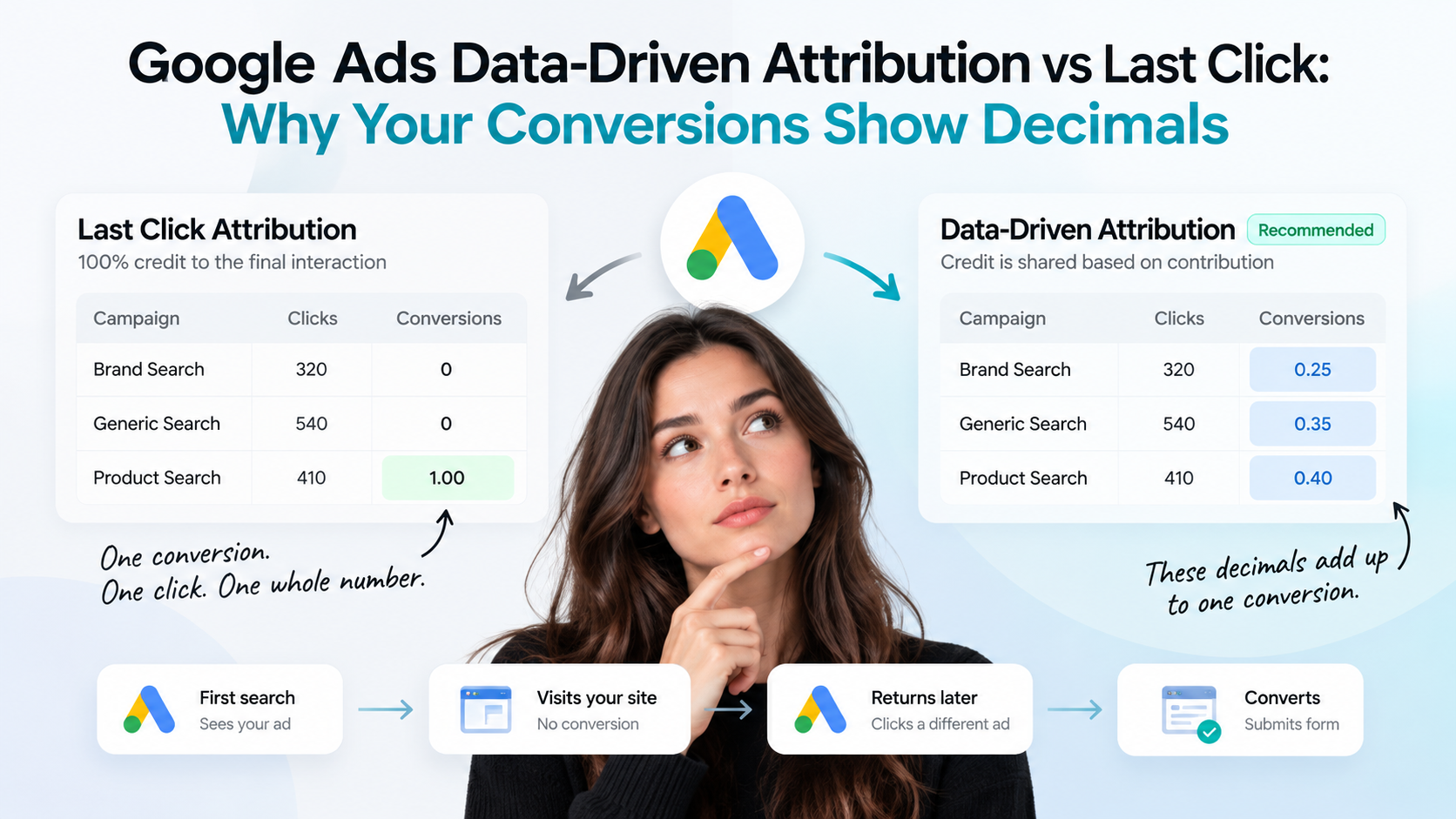
Last Click assigns all available Google Ads conversion credit to the final eligible Google Ads interaction before the conversion.
Take a realistic journey. Someone searches a broad, generic term for the service you offer. They click your ad, have a look around your site, and leave without doing anything. Four days later they come back through another Google Ads interaction, this time on a much more specific search, and they fill in your enquiry form.
Under Last Click, the second interaction takes the entire conversion. The first one records a click, some cost and no conversion at all.
The reporting that comes out of this is clean. Every conversion sits in one row, attached to one campaign, one ad group and one keyword. Whole numbers throughout. It is easy to read in a meeting and easy to put in a spreadsheet.
The trade-off is that it tells you nothing about what happened earlier. That first generic search did real work. It introduced the brand and brought someone onto the site who later came back and converted. Last Click does not show that, so campaigns doing genuine early-stage work can look like they are producing nothing, and over time they tend to get cut.
There is one detail worth being precise about, because it causes a lot of confusion. Google Ads attribution only distributes credit between eligible Google Ads interactions. It is not a cross-channel model. If someone found you through organic search, then an email, then a Google Ads click, Google Ads attribution is only deciding between the Google Ads touchpoints. Understanding the full cross-channel picture is a GA4 and CRM question, not a Google Ads attribution setting.
What is Data-Driven Attribution?
Data-Driven Attribution uses conversion path data from your own account to estimate how much each eligible ad interaction contributed to a conversion, and distributes credit accordingly.
Google describes it as using your account’s data for that specific conversion action to estimate each interaction’s contribution. It is modelled from how your conversion paths actually behave, not from a fixed rule applied to every advertiser.
Returning to the journey above, Data-Driven Attribution might allocate it like this:
- Campaign A: 0.3 conversion credit
- Campaign B: 0.7 conversion credit
Total: 1 conversion.
One lead. One person. One form submission. The credit for it has been divided according to what the model estimated each interaction contributed.
It is worth being careful here, because this is where most explanations overreach. Data-Driven Attribution does not always split credit. If a conversion only involved one eligible interaction, that interaction gets the whole thing. If the model concludes one interaction did effectively all the work, the distribution can be heavily weighted towards it. The allocation depends on the conversion journey and on Google’s modelling of it, and it will not look the same in every account or for every conversion action.
Data-Driven Attribution is currently the default attribution model for most conversion actions in Google Ads.
Data-Driven Attribution vs Last Click at a glance
| Area | Data-Driven Attribution | Last Click |
|---|---|---|
| Conversion credit | Distributed across eligible interactions based on modelled contribution | All credit to the final eligible interaction |
| Decimal conversions | Possible, and normal | Generally whole conversions at interaction level |
| Customer journey visibility | Broader view across the path | Focused on the final interaction |
| Smart Bidding signals | Richer journey information | More concentrated signal |
| Reporting simplicity | More complex to read | Simpler to read |
| Recommended for | Most mature Google Ads accounts | Specific measurement requirements |
Why Does Google Ads Show 0.4 Conversions?
This deserves its own explanation, because the confusion is almost always about the difference between two things that sound identical and are not.
An actual conversion is an event that happened in the real world. Someone submitted a form, bought something, rang the business or completed whatever action you defined as valuable. These are always whole. There is no such thing as a third of an enquiry.
Attributed conversion credit is how much of that conversion Google assigns to a particular campaign, ad group, keyword or interaction. This is the number in your reporting table, and it can absolutely be fractional.
So when a row shows 0.4, it is not saying that 0.4 of a customer appeared. It is saying that this particular campaign was modelled as responsible for roughly 40 per cent of the credit for a conversion that did fully happen somewhere in your account.
You will see values like 0.25, 0.4 and 0.75 at the campaign or keyword level for exactly this reason.
Numbers above 1 with decimals attached, such as 1.3 conversions, work the same way but aggregated. If a campaign received 0.7 credit from one conversion and 0.6 from another, the reporting row shows 1.3. Two real conversions occurred. This campaign was credited with part of each.
A useful sanity check: for any single conversion, the credit distributed across all eligible Google Ads interactions still adds up to 1. You are not losing or gaining conversions by using Data-Driven Attribution. You are seeing the same total split differently across the rows.
Data-Driven Attribution and Smart Bidding
Attribution is not only a reporting preference. It feeds the bidding.
Google Ads Smart Bidding strategies, including Maximise Conversions, Target CPA, Maximise Conversion Value and Target ROAS, make bidding decisions based on conversion data. The attribution model shapes which interactions that data associates with valuable outcomes.
Under Last Click, the signal is concentrated on final interactions. Under Data-Driven Attribution, the system has a broader representation of the path, including interactions that contributed earlier without closing the conversion themselves.
We would stop short of the claim you often see, which is that switching to Data-Driven Attribution will improve performance. That is not something anyone can promise, and in our experience results vary by account, by sales cycle length and by how clean the underlying conversion tracking is in the first place. What is fair to say is that it gives the bidding system a broader view of the journey, and it is generally Google’s recommended approach where it is available.
If your conversion tracking itself is inaccurate, the attribution model is a secondary problem. A better model applied to bad data produces confident, well-distributed, wrong answers.
Why Google Ads and your CRM may disagree
This is where most of the real-world friction happens, so it is worth going through properly.
A typical scenario: the CRM records one lead, attributed to Campaign B. Google Ads shows 0.7 against Campaign B and 0.3 against Campaign A. Someone concludes the tracking is broken.
Usually it is not. The two systems are answering different questions.
Your CRM asks: where did we ultimately assign this lead?
Google Ads attribution asks: which eligible Google Ads interactions contributed to this conversion?
A CRM generally needs to assign one lead to one source. That is not a limitation, it is a requirement. Sales teams need an owner, operations needs a clean record, and pipeline reporting needs each opportunity counted once. Splitting a lead 70/30 across two campaigns would make the CRM worse at its job.
Google Ads attribution is trying to do something different. It is estimating advertising contribution so that reporting and bidding reflect how the conversion actually came about.
Both can be right at the same time. The numbers do not need to reconcile exactly, and an account where they match perfectly is often one where something has been simplified away.
There are other common reasons the two disagree, and it is worth ruling these out before concluding anything:
- Attribution windows. Google Ads counts a conversion against the date of the ad interaction. Your CRM records the date the lead arrived. A click on the 28th producing a lead on the 2nd lands in different months in each system.
- Different attribution models. Comparing a Data-Driven Google Ads report against a last-touch CRM report is comparing two different methodologies.
- Cross-device behaviour. Someone researches on a phone and converts on a laptop. Google may connect that journey where a simpler setup will not.
- Consent and privacy restrictions. Where consent is declined, some conversions are modelled rather than directly observed.
- Offline conversions. If leads are qualified or closed offline and that data is not fed back, Google Ads cannot see what happened after the form.
- Duplicate or missing tracking. Double-firing tags inflate numbers, missing tags suppress them. Both are common and both are fixable.
- Different definitions of a conversion. Google Ads may be counting every form submission while the CRM only counts qualified enquiries, with spam and duplicates removed.
That last one causes more arguments than any of the others, and it is the first thing we check.
Should you change to Last Click to match your CRM?
Generally, no.
We would not recommend changing your attribution model because:
- Somebody dislikes seeing decimals
- The CRM uses a last-touch logic
- Management would prefer whole numbers
- Google Ads does not exactly match another reporting platform
None of those are measurement reasons. They are presentation reasons, and changing attribution to fix a presentation problem means changing how your bidding understands your customers in order to make a slide easier to read.
Your attribution setting should reflect how the business genuinely wants to evaluate advertising contribution. If you want to understand which campaigns contribute across the journey, Data-Driven Attribution is built for that question. If you switch to Last Click, the decimals disappear, but so does the visibility into everything that happened before the final click. The reporting becomes tidier without becoming more accurate.
When might Last Click make sense?
To be balanced about it, there are situations where Last Click is a reasonable deliberate choice:
- Very short, simple customer journeys, where most conversions genuinely involve a single interaction and there is little path to model
- A specific reporting framework requires it, for example a group-level measurement standard applied consistently across markets or channels
- You are deliberately evaluating final-touch acquisition as a specific question, rather than overall contribution
- Testing and attribution comparisons, where you want a like-for-like baseline against another dataset
The common thread is that each of these is a measurement decision made on purpose, with an understanding of the trade-off. That is a very different thing from switching models because the numbers looked untidy.
How to Check Your Attribution Model in Google Ads
The interface has changed a few times, so here is the current path.
To see which model a conversion action is using:
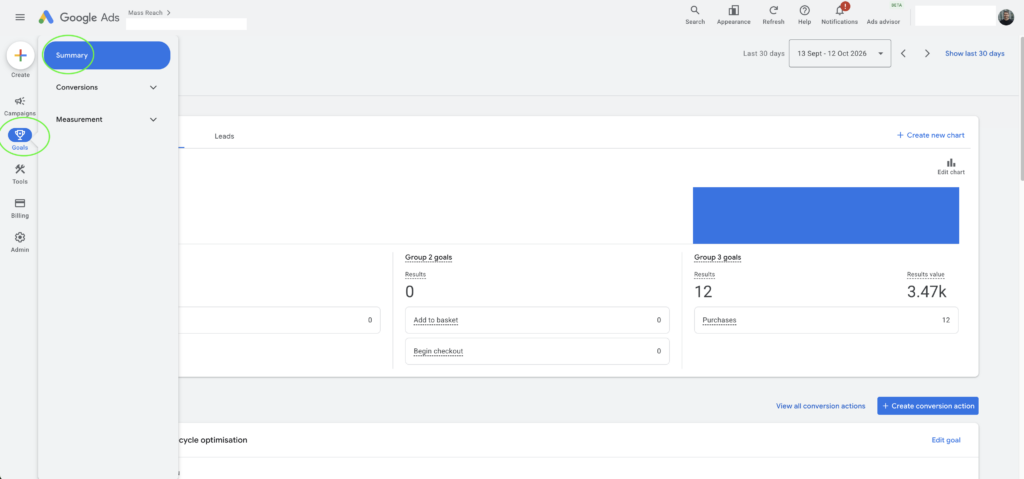
- Open Google Ads and go to Goals in the left-hand menu.
- Open Conversions, then Summary.
- Select the Goals tab.
- Hover over an individual conversion action to view its attribution model, alongside its conversion value, conversion windows, source and counting setting.
To change the model:
- Go to Goals, then Summary.
- Select the conversion name in the table.
- Select Edit settings.
- Select Attribution model and choose from the drop-down.
- Select Save, then Done.
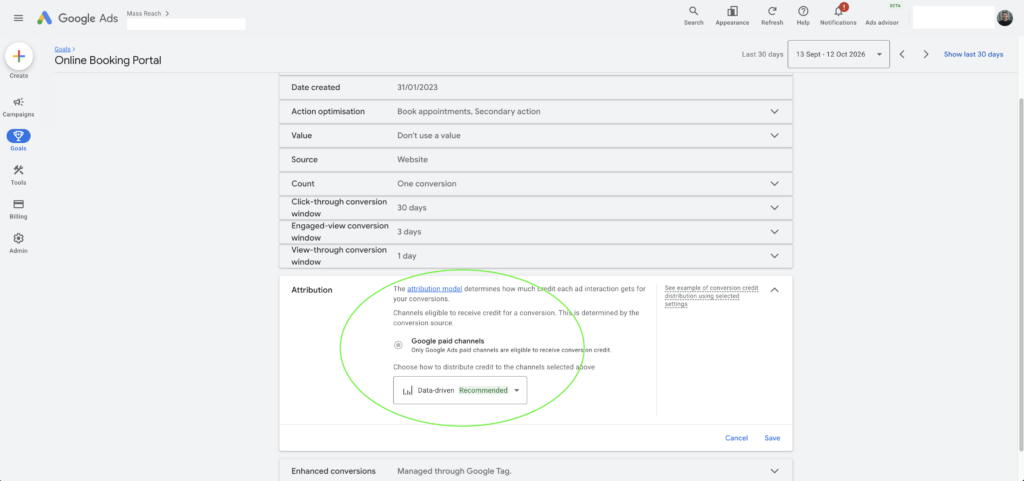
One thing that catches people out: if you use cross-account conversion tracking at manager account level, the attribution model needs to be set in the manager account rather than the individual account.
It is also worth knowing what you will not find in that drop-down any more. Google Ads previously offered First Click, Linear, Time Decay and Position-Based models. These are no longer supported, and conversion actions that used them were migrated to Data-Driven Attribution. The choice today is between Data-Driven and Last Click.
Our View at Mass Reach
Data-Driven Attribution is generally the model we would prefer for most mature Google Ads accounts, where there is sufficient conversion path data and the required functionality is available. It reflects the customer journey more completely than Last Click, and it gives Smart Bidding a broader picture to work from.
But attribution should never be considered in isolation, and we would push back on anyone treating it as the main lever.
Accurate conversion tracking matters more. Enhanced Conversions matter more. Feeding qualified lead and revenue data back from the CRM matters more. Clearly defined business outcomes, so that everyone agrees what actually counts as a conversion, matter a great deal more than which of two models is selected in a drop-down.
Across our performance marketing services we work with Google Ads, conversion tracking, Google Tag Manager, GA4, Enhanced Conversions, CRM attribution and performance reporting, and in practice the accounts with measurement problems almost never have an attribution model problem. They have a tracking problem, a definitions problem, or a gap between what the ad platform can see and what the business actually values.
Changing to Last Click purely to make reporting look cleaner will make the numbers easier to explain. It will not make the measurement more useful, and it may quietly remove the evidence that justifies some of your better-performing upper-funnel activity.
If the decimals are the only thing bothering you, the decimals are not the problem.
Not sure whether your Google Ads tracking and attribution are set up correctly?
Mass Reach can review your Google Ads account, conversion tracking, GA4 and Google Tag Manager setup and identify where measurement issues may be affecting your reporting and your bidding.
If that would be useful, you can book a free digital marketing consultation with our team.
Frequently asked questions
Because Google Ads is reporting conversion credit, not a count of leads. A value of 0.5 means that campaign, ad group or keyword was modelled as responsible for around half the credit for a conversion that fully happened. Under Data-Driven Attribution, credit for a single conversion is distributed across the eligible ad interactions that contributed to it.
No. Every conversion recorded is a whole, real action by a real person. The decimal only describes how much credit a particular campaign or keyword received for it. Added together across all eligible Google Ads interactions, the credit for a single conversion still totals 1.
For most mature accounts it gives a broader and more representative view of the customer journey, and it is Google’s default for most conversion actions. It will not automatically improve performance, and the right answer depends on your sales cycle, your data and how you want to evaluate advertising contribution.
Not necessarily, and expecting an exact match usually causes more problems than it solves. A CRM assigns one lead to one source for sales and operational reporting. Google Ads estimates how multiple ad interactions contributed. Differences also come from attribution windows, conversion dates versus interaction dates, cross-device journeys, consent restrictions and different definitions of what counts as a conversion.
Yes. Smart Bidding strategies such as Maximise Conversions, Target CPA, Maximise Conversion Value and Target ROAS use conversion data to make bidding decisions, and the attribution model shapes which interactions are associated with valuable outcomes. Data-Driven Attribution provides a broader view of the path than Last Click.
Yes. Last Click is still supported and can be selected for a conversion action. The First Click, Linear, Time Decay and Position-Based models are no longer available, and conversion actions that previously used them were moved to Data-Driven Attribution.
Data-Driven Attribution is the default model for most conversion actions in Google Ads, which reflects Google’s general recommendation where it is available.