


Advertising has arrived inside ChatGPT, and for most businesses it is still genuinely new territory. OpenAI began showing ads to Free and ChatGPT Go tier users in the United States in February 2026, and by June that same year the self serve Ads Manager had reached UK businesses too, ahead of most of Europe. There is no large minimum spend to clear before testing it, and the interface will feel familiar to anyone who has built a campaign in Google Ads or Meta Ads Manager. What is genuinely different is how targeting works underneath it.
ChatGPT does not let advertisers bid on keywords the way search advertising does. Instead, campaigns are matched to conversations using what OpenAI calls context hints, short descriptions of the topics, problems or products an advertiser is relevant to, combined with signals from the ad itself and the landing page it points to. There is no access to the content of anyone’s private conversation, and no way to guarantee an ad will show against a specific query. For a business used to exact match keywords, that takes some unlearning.
This guide walks through what ChatGPT Ads are, how they actually appear to users, who can currently advertise, and how OpenAI Ads Manager is structured from campaign down to individual ad. It covers targeting through context hints, conversion tracking through the OpenAI Pixel and Conversions API, audience uploads, product feeds for ecommerce catalogues, and how the platform’s costs and bidding compare with the channels most businesses already know. Every screenshot in this guide comes from our own live Ads Manager account rather than OpenAI’s documentation, because there is a meaningful difference between reading about a setting and watching where it actually sits in the interface.
By the end, you should be able to judge honestly whether ChatGPT Ads deserve a place in your marketing mix this year, and if they do, exactly how to set up your first campaign.
What Are ChatGPT Ads?
ChatGPT Ads are sponsored cards that appear inside a conversation while someone is chatting with ChatGPT. They are clearly labelled as advertising, they sit for users on the Free and ChatGPT Go tiers only, and they are never shown to anyone paying for Plus, Pro, Team, Business or Enterprise access. That last point matters more than it might first appear. A meaningful share of the professionals a business might most want to reach, the ones with a company funded ChatGPT subscription, will simply never see an ad on the platform, at least under the current tier structure.
OpenAI’s own framing for the format has been that advertising helps fund continued free access to ChatGPT while keeping the paid tiers advertising free. Whatever the commercial reasoning, the practical result for advertisers is a new, still relatively uncrowded placement inside one of the fastest growing pieces of software most people now use every day.
How Do Ads Appear in ChatGPT?
The clearest way to understand the format is to look at a live example rather than a description of one.
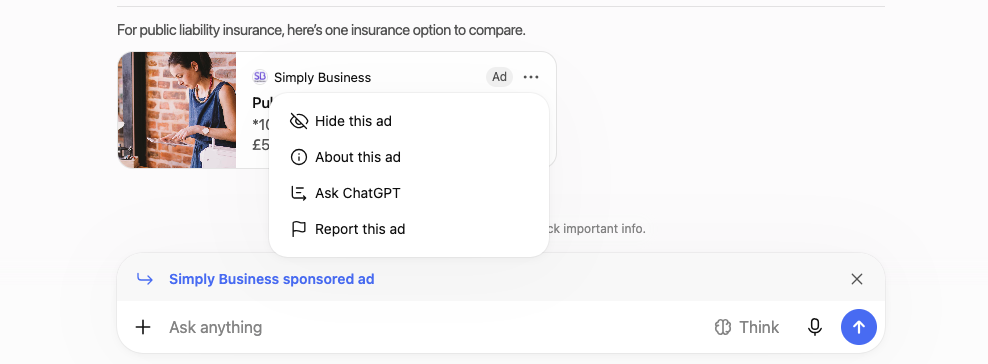
This is a real ad served to a user asking ChatGPT about public liability insurance. It appears as a card with an image, the advertiser’s name, Simply Business in this case, and a small “Ad” label so it is never mistaken for ChatGPT’s own answer. Tapping the three dot menu on the card opens four options: Hide this ad, About this ad, Ask ChatGPT and Report this ad, giving the user direct control over what they see and a way to flag anything misleading. Above the message box itself sits a separate strip reading “Simply Business sponsored ad”, a second, persistent reminder of who is behind the content the user is looking at.
For a business weighing up the format, this level of labelling is worth understanding upfront. Ads on ChatGPT are not woven invisibly into the answer itself. They sit alongside it, clearly marked, and the user can dismiss or report them at any point.
Who Can Advertise on ChatGPT?
Access has expanded quickly since launch, and the rollout is worth knowing in outline because it explains why some features and markets are more mature than others.
ChatGPT started showing ads to US users on the Free and ChatGPT Go tiers on 9 February 2026. At that point, buying an ad meant going through one of OpenAI’s launch agency partners, Dentsu, Omnicom, Publicis or WPP, with a minimum spend reported at $200,000. That changed on 5 May 2026, when OpenAI opened a self serve Ads Manager to every US business, removed the minimum spend entirely, and introduced cost per click bidding alongside the original cost per thousand impressions model.
The United Kingdom followed as one of the first international self serve markets, with access opening to UK businesses around 6 June 2026, alongside Canada, Australia and New Zealand. By the end of August 2026, OpenAI reported that ChatGPT Ads had passed a $1 billion annualised revenue run rate in under two hundred days, and announced a further expansion of self serve buying into India, Europe, the Middle East and North Africa.
The practical takeaway for a UK business reading this now is straightforward. Self serve access exists, there is no minimum spend standing in the way of a test, but availability and specific features can still differ by market, so it is worth checking your own Ads Manager account rather than assuming every capability described here is switched on everywhere yet.
How OpenAI Ads Manager Works
Once an account is set up, the Ads Manager interface sits at ads.openai.com and follows a layout most advertisers will find familiar. A left hand navigation splits into an Overview, Campaigns, a Tools section covering Conversions, Feeds, Change History and Audiences, then Billing and Settings.
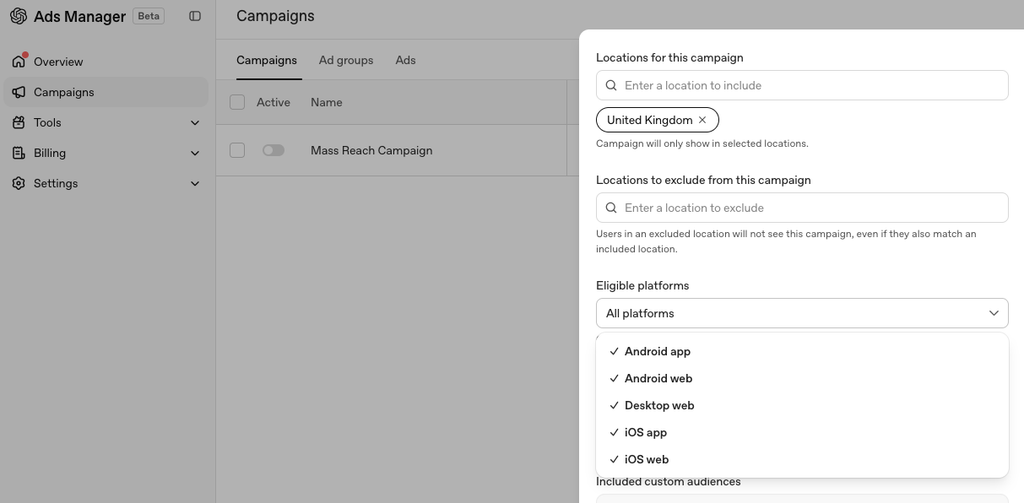
Within Campaigns, the interface splits again into three tabs: Campaigns, Ad groups and Ads. That three level structure, campaign at the top, ad groups beneath it, individual ads beneath that, will be immediately recognisable to anyone who has worked in Google Ads or Meta Ads Manager, which makes the learning curve for the interface itself fairly gentle even where the underlying targeting logic is genuinely new.
ChatGPT Ads Campaign Structure
Each campaign sets the overall objective, budget and eligible locations. Ad groups sit beneath a campaign and are where bidding strategy and context hints are configured. Individual ads sit within an ad group and carry the actual creative, image, headline and description, that a user ultimately sees.
This structure gives advertisers room to test multiple targeting approaches, through different context hints in different ad groups, while keeping budget and reporting consolidated at the campaign level. It is a sensible, familiar shape for anyone already managing paid media elsewhere.
Campaign Objectives: Views, Clicks and Conversions

Every campaign starts with an objective, the metric OpenAI’s delivery system optimises toward. In the screenshot above, this campaign is set to Clicks, meaning delivery is tuned to drive people to the destination link on the ad. Choosing the right objective matters more than it might seem, since it changes how the platform’s automated delivery behaves behind the scenes, not just how results are reported afterwards. A business chasing brand awareness and one chasing measurable enquiries should generally not be running the same objective, even if the underlying ad looks identical.
What Are Context Hints?
This is the section worth slowing down for, because it is the single most common source of confusion for advertisers arriving from a keyword based platform.
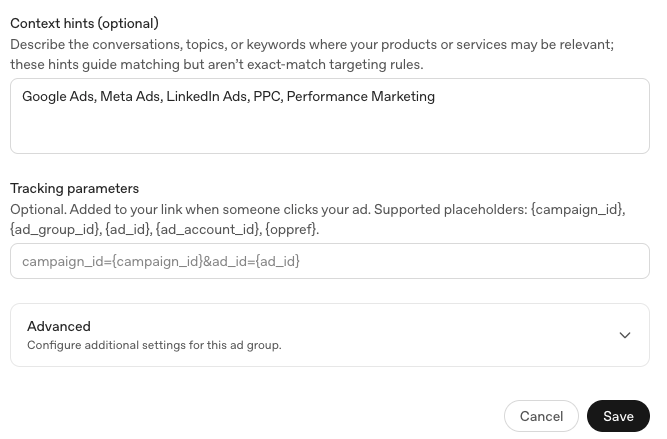
Context hints are a free text field at the ad group level where an advertiser describes the conversations, topics or keywords their products or services may be relevant to. In the account shown above, the context hints entered are Google Ads, Meta Ads, LinkedIn Ads, PPC and Performance Marketing, a description of the kind of conversation this advertiser wants to be considered for.
OpenAI is explicit that these hints guide matching rather than defining it outright. They are not exact match keywords, and entering a context hint does not guarantee an ad will show whenever that topic comes up. The system weighs the hint alongside the ad itself and the landing page it points to, then decides relevance conversation by conversation. Anyone bringing a Google Ads mindset to this field, treating it as a keyword list to bid on precisely, will misunderstand how the platform actually behaves. Context hints describe an area of relevance. They do not buy a guaranteed placement.
How ChatGPT Ad Targeting Works
Context hints are one input into a broader targeting picture. Delivery also draws on signals from the ad creative itself and the landing page it links to, and, where configured, on audience lists and location targeting.
What targeting on ChatGPT does not include is any access to the actual content of a user’s conversation. Advertisers never see what someone typed, only aggregated results after the fact, clicks, conversions and spend, never individual chat transcripts. This is worth stating plainly to anyone unfamiliar with the platform, since it is often the first question a cautious business asks.
How to Create ChatGPT Ads
Setting up a first campaign follows a logical order inside Ads Manager. Start at the Campaigns tab and create a new campaign, choosing an objective and setting the locations and platforms you want it eligible on, desktop web, Android or iOS app and web, as shown earlier in this guide. From there, build an ad group beneath the campaign, set a bidding strategy and write your context hints, describing the conversations you want to be considered relevant to. Finally, create the ad itself within that ad group, adding the image, headline and description a user will actually see.
Before switching a campaign live, it is worth confirming conversion tracking is already in place, covered in more detail below, since campaigns that can measure conversions from day one are simply more useful to optimise than ones bolted on retrospectively.
ChatGPT Ads Creative Best Practices
Creative on ChatGPT works best when it reads as genuinely useful within a conversation rather than as an interruption to one. A user asking about public liability insurance, to return to the earlier example, is actively looking for exactly that kind of help, so an ad that answers the question directly tends to sit far more naturally than one written in a purely promotional register. Specific image and copy length requirements are set by OpenAI and do change as the platform matures, so these are worth confirming against OpenAI’s current creative specifications at the point of building a campaign rather than assuming older guidance still applies.
ChatGPT Ads Costs and Bidding
Ads Manager currently supports two main bidding approaches at the ad group level, shown in the account below.
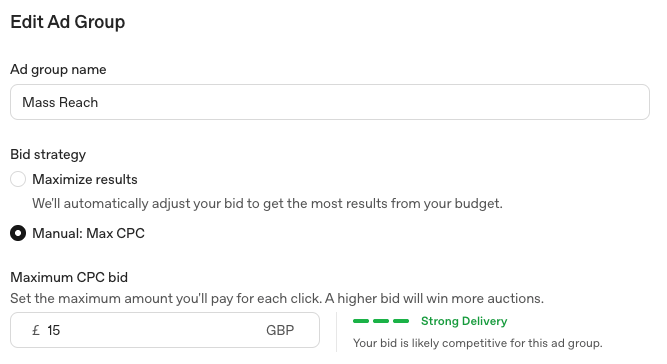
Maximise results lets OpenAI automatically adjust bids to get the most results from a set budget, while Manual: Max CPC, selected in the account above with a maximum bid of £15, gives the advertiser direct control over the ceiling they are willing to pay per click. A cost per action option has also since been introduced for accounts with an active conversion event flowing through the Pixel or Conversions API, allowing bidding toward a completed action rather than a click alone.
Underneath whichever strategy is chosen, the auction itself has been described as relevance weighted and second price, meaning a more relevant, better matched ad can beat a larger bid from a less relevant one, and the winning advertiser pays only just above the next highest effective bid rather than their full maximum. Reported starting figures have put a recommended cost per click in the region of three to five dollars and a default maximum CPM near sixty dollars, though real world CPMs have reportedly settled lower as more advertisers have joined the platform. These numbers move quickly and should always be checked against OpenAI’s current advertiser documentation rather than treated as fixed.
Conversion Tracking and the OpenAI Pixel
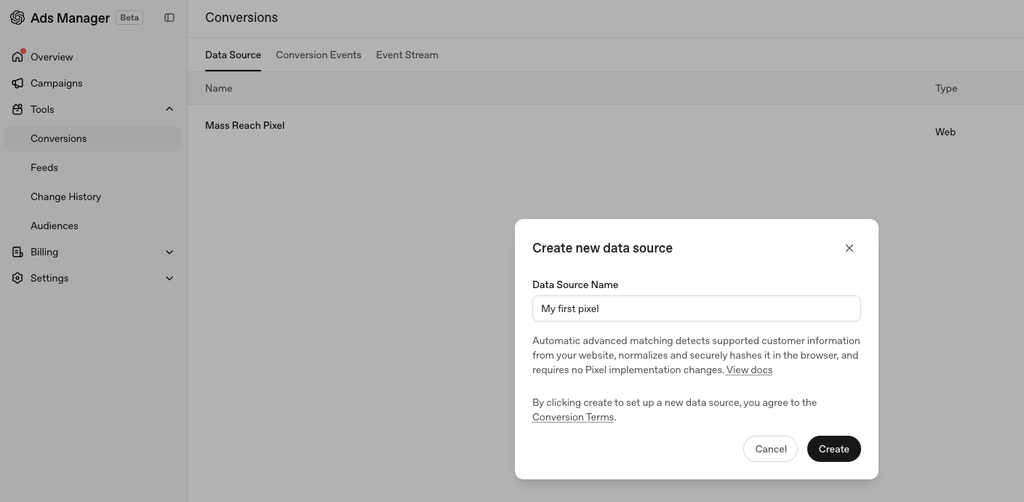
Measurement on ChatGPT Ads works through two complementary tools. The OpenAI Pixel tracks conversion events in the browser, similar in principle to a Meta or Google Ads pixel, while the Conversions API allows the same events to be sent server side, useful where browser tracking alone is unreliable or where a business prefers to control what data leaves its own systems directly. Both exist to answer the same question: what did someone do after clicking this ad, without ever exposing the conversation that led them there.
Setting up a pixel, shown live in the account above, is one of the more straightforward technical steps in the whole process, and one worth completing before a campaign goes live rather than after, so that the very first clicks a campaign generates are already measurable.
Audiences and First Party Data
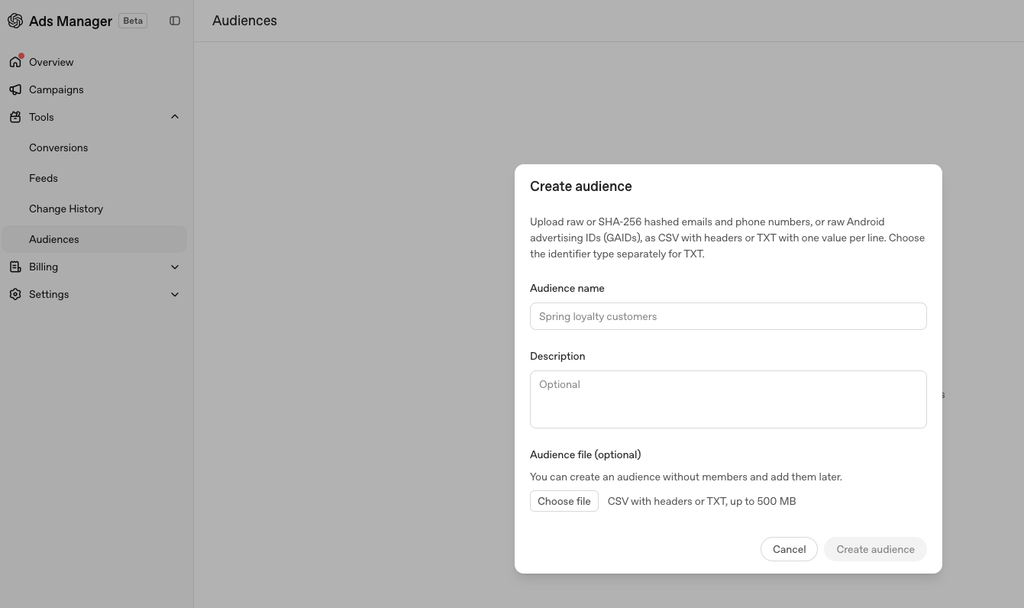
Advertisers can build custom audiences by uploading a list of SHA-256 hashed or raw emails, phone numbers or Android advertising IDs, as a CSV file with headers or a plain text file with one value per line. This will feel immediately familiar to anyone who has built a customer match audience in Google Ads or a custom audience in Meta Ads Manager. An audience can also be created empty, with a name and description set up in advance and members added later, useful for a business still assembling its list before a campaign is ready to launch.
Product Feeds and Ecommerce Advertising

For a business selling physical products, Ads Manager supports connecting a full catalogue rather than building ads one product at a time. There are three ways to send products in: a manual CSV or TXT upload, best for getting started or for occasional updates, a hosted URL pointing to a product catalogue already available at a web address, best where that catalogue already exists and updates itself, or an SFTP connection for a fully automated, server to server feed, best suited to a technical team that wants updates to flow through without manual intervention. Whichever method is chosen, products submitted this way become eligible for ads only, not for any other surface, at least under the platform’s current setup.
How ChatGPT Ads Differ from Google Ads
The most fundamental difference is that Google Ads is built around a search query and a keyword an advertiser bids to match against it, while ChatGPT Ads are built around a context hint describing relevance and a conversation the system judges that relevance against. There is no exact match, no search terms report in the traditional sense, and no keyword level bid adjustments to make. Measurement also differs in emphasis, with ChatGPT’s pixel and Conversions API doing a similar job to Google’s own conversion tracking, but built for a conversational surface rather than a results page. A business used to granular keyword control should expect to spend real time recalibrating how they think about targeting here, rather than assuming the two platforms can be managed with an identical playbook.
How ChatGPT Ads Differ from Meta Ads
Meta’s targeting leans heavily on audience data, interests, behaviours and lookalike modelling built from a huge social graph. ChatGPT’s targeting leans instead on the immediate context of a conversation happening right now, closer in spirit to intent based search advertising than to audience based social advertising, even though the placement itself sits inside a chat interface rather than a search results page. Where the two platforms genuinely overlap is in the mechanics underneath, pixel based conversion tracking and hashed audience uploads will both feel familiar to a team already running Meta campaigns, even if what drives delivery above that layer is different.
What Businesses Are a Good Fit?
ChatGPT Ads tend to suit businesses selling something people research before they buy, rather than an impulse purchase. Professional services, business to business software, and any product or service with a genuine comparison or research phase are a natural fit, precisely because that research phase is where people increasingly turn to ChatGPT itself. A business whose customers ask detailed, considered questions before committing has a real reason to be present at the moment those questions get asked, in a way a business selling low consideration, impulse driven products may not.
How to Set Up Your First Campaign
Pulling the steps above into a single checklist: choose an objective that matches what you actually want the campaign to achieve, set your locations and eligible platforms, build an ad group with clear context hints describing your area of relevance, choose a bidding strategy appropriate to your budget and risk appetite, connect your pixel or Conversions API before launch, and write creative that answers a genuine question rather than simply promoting a product. None of these steps are individually complicated. Getting the sequence right, particularly measurement before launch rather than after, is what separates a useful first test from a wasted one.
Common ChatGPT Ads Mistakes
The mistakes worth watching for follow directly from everything above. Treating context hints as an exact match keyword list is the most common, and tends to lead to disappointment when delivery does not behave the way a Google Ads campaign would. Skipping pixel or Conversions API setup before launch is another, since it leaves the earliest and often most informative clicks a campaign generates completely unmeasured. Assuming every user your business wants to reach is reachable is a third, given that paid tier subscribers never see ads at all under the current structure. And assuming every feature available in the US is already live in the UK, or any other newer market, is worth double checking directly inside your own account rather than taking for granted.
How to Measure Performance
Ads Manager’s own reporting covers the basics, impressions, clicks and spend, at campaign, ad group and ad level. Layered on top of that, the Pixel and Conversions API bring in what actually happened after the click, signups, purchases, enquiries or whatever conversion event matters most to the business running the campaign. In the first few weeks of testing a genuinely new channel, it is worth setting expectations around learning rather than scale. The goal early on is understanding which context hints, creative and objectives produce meaningful results for your specific business, not hitting a volume target a more mature channel might already support.
Should Your Business Test ChatGPT Ads?
Taken together, ChatGPT Ads represent genuinely new advertising inventory, inside a product with a fast growing user base, with no minimum spend standing between a business and a first test. That is a reasonable case for trying a modest budget, particularly for a business whose customers research before they buy. It is not yet a case for moving a significant share of an existing budget across. The platform, its pricing and its market availability have all changed multiple times since February 2026, and a channel still moving that quickly deserves a measured test rather than a full commitment.
Getting Started with ChatGPT Ads and Mass Reach
Every screenshot in this guide came from Mass Reach’s own live account, not from OpenAI’s documentation, because we set our own campaigns up in Ads Manager rather than reading about the platform secondhand before writing this. As a London based performance marketing consultancy, Mass Reach already manages Google Ads, Meta Ads and LinkedIn Ads for UK B2B and ecommerce brands, and we have brought that same hands on, evidence led approach to ChatGPT Ads since UK self serve access opened. If your business is weighing up whether ChatGPT Ads belong in this year’s marketing mix, we can help you set up a first campaign properly, from context hints and conversion tracking through to product feeds for an ecommerce catalogue, rather than leaving you to work out a genuinely new platform alone. Get in touch with Mass Reach to talk through what a first ChatGPT Ads test could look like for your business.