
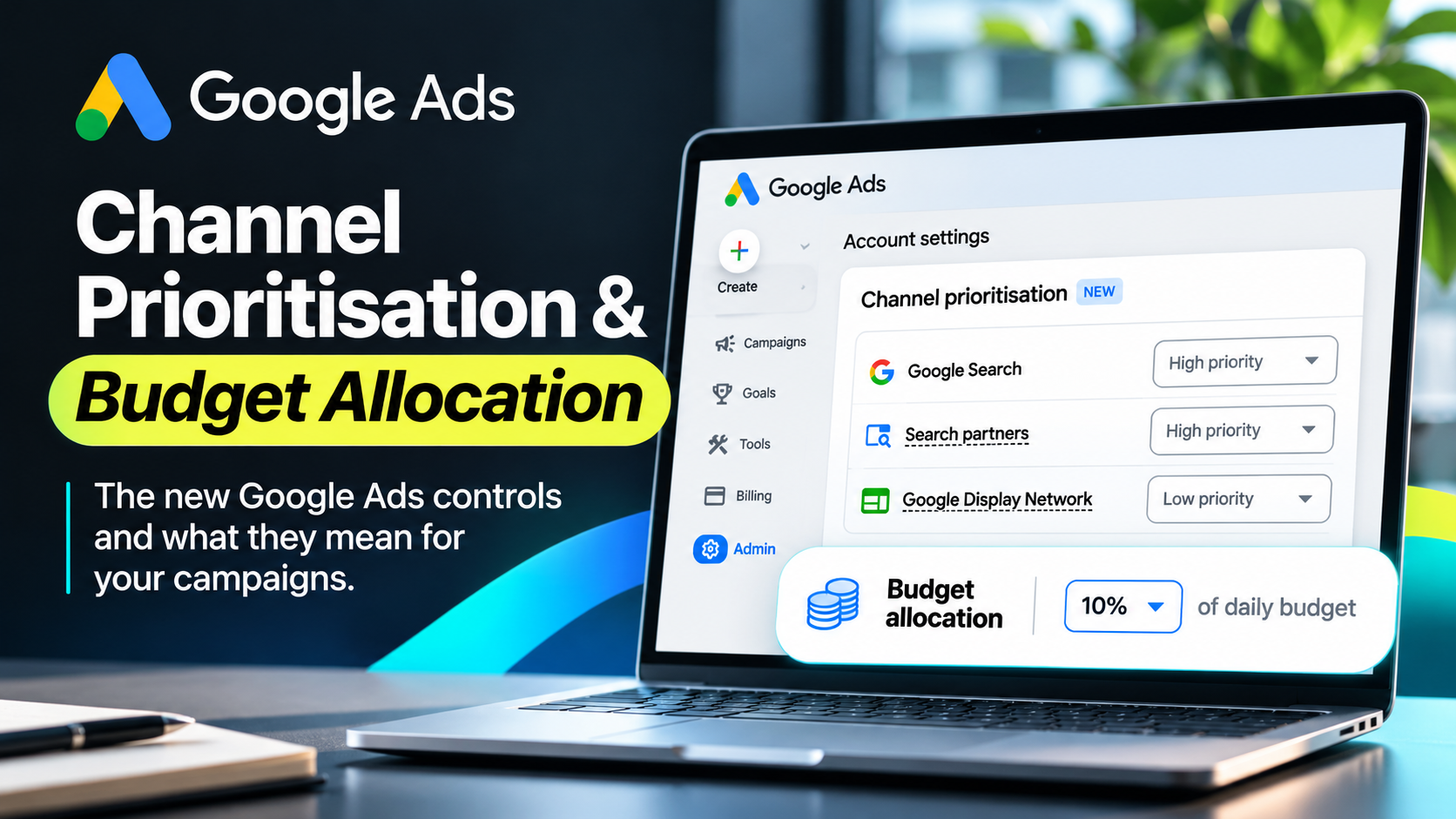

Google Ads has introduced new controls that give advertisers more influence over how they spend their budgets across different advertising channels.
The new feature, called Channel Prioritisation and Budget Allocation, allows eligible advertisers to prioritise Google Search, Search Partners and the Google Display Network. Advertisers can also assign a percentage of their daily budget to certain lower-priority channels.
For businesses investing in PPC advertising, this update offers more flexibility when managing campaign budgets. However, the new settings do not give advertisers complete control over every pound they spend. Google’s automated bidding systems still influence how campaigns deliver adverts.
With the rollout underway and further changes coming in February 2027, businesses should understand how these controls work and what they could mean for campaign performance.
What Is Google Ads Channel Prioritisation?
Channel Prioritisation is a new Google Ads setting that allows advertisers to tell Google which advertising channels should receive spending priority.
Rather than treating every eligible channel equally, advertisers can assign each one a High priority or Low priority setting. For example, a business running a Search campaign may want Google Search to receive priority over Search Partners and the Google Display Network. The new feature allows the advertiser to communicate that preference directly within Google Ads.
The important distinction is that priority does not always determine exactly where the budget will go. Google still considers the campaign’s bidding strategy, performance targets and available opportunities. However, the setting gives advertisers another way to influence how their advertising budget is used.
Google began rolling out Channel Prioritisation on 15 October 2026. The feature is being introduced gradually, meaning some accounts may receive access before others.
How Do High and Low Priority Channels Work?
Google Ads now allows advertisers to choose between two priority levels. Understanding how each one works is important before changing an existing campaign.
High Priority Channels
Google aims to spend on High priority channels first, while considering the campaign’s bidding strategy and performance targets.
For example, a business could give Google Search High priority because it generates qualified enquiries from people actively searching for its services.
By default, Google assigns High priority to eligible channels. Advertisers can change these settings to reflect their campaign objectives.
Low Priority Channels
Google considers Low priority channels after higher-priority opportunities. However, assigning Low priority does not automatically stop a channel from receiving advertising spend.
The results also depend on the bidding strategy. For example, campaigns using Target CPA or Target ROAS may see little change when their budgets are not limited.
This is where the new Budget Allocation controls become particularly useful.
What Is Google Ads Budget Allocation?
Budget Allocation gives advertisers another way to influence spending on channels they have assigned Low priority.
Instead of relying only on priority levels, advertisers can specify a percentage of their average daily budget for a particular lower-priority channel.
For example, imagine a business has a Google Ads budget of £100 per day. The company wants to focus primarily on Google Search but is happy to spend a smaller amount on the Display Network.
It could set Google Search to High priority and the Display Network to Low priority, with a 10% budget allocation.
Google would then aim to keep Display spending at or below approximately £10 per day.
However, budget allocations work as best-effort limits, not guaranteed daily spending caps. Google may occasionally exceed the selected percentage.
The calculation also uses the campaign’s average daily budget rather than its actual spending on a particular day.
Advertisers should therefore monitor channel spending after making changes.
Google also allows a 0% allocation for eligible Low priority channels. Unlike other percentages, this setting prevents spending on that channel.
Which Google Ads Campaigns Support Channel Prioritisation?
Google is introducing the feature across Search, Shopping, Performance Max and Demand Gen campaigns. However, each campaign type offers slightly different controls.
Search Campaigns
Search campaigns can prioritise Google Search, Search Partners and the Google Display Network.
This offers businesses greater influence over where Google spends their advertising budgets. It may be particularly useful for companies that rely on high-intent searches to generate enquiries.
Shopping Campaigns
Shopping campaigns support Channel Prioritisation across Google Search and Search Partners.
For eCommerce businesses, these settings provide another way to manage spending while focusing on product sales and advertising performance.
Performance Max Campaigns
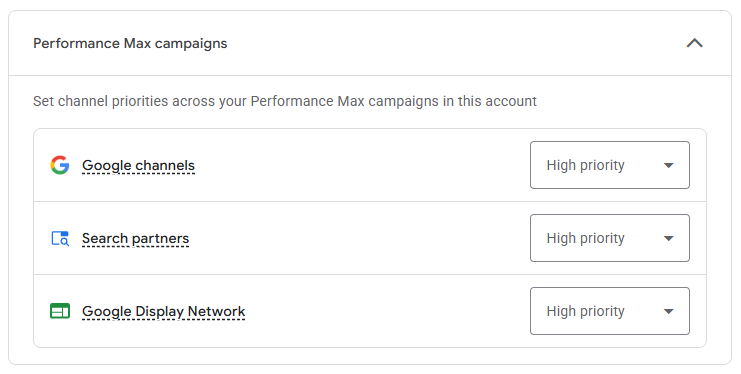
Performance Max campaigns support priority settings for Google channels, Search Partners and the Google Display Network.
However, Google groups several advertising surfaces together under Google channels. These include Search, YouTube, Maps, Gmail and Discover.
This means advertisers cannot use the new feature to assign an exact budget percentage to each individual Google platform within Performance Max.
Demand Gen Campaigns
Demand Gen campaigns support Channel Prioritisation across eligible channels.
However, Google does not currently support percentage-based Budget Allocation for Demand Gen campaigns.
Advertisers can therefore adjust channel priorities but cannot use the same budget percentage controls that other eligible campaign types offer.
How to Find Channel Prioritisation in Google Ads
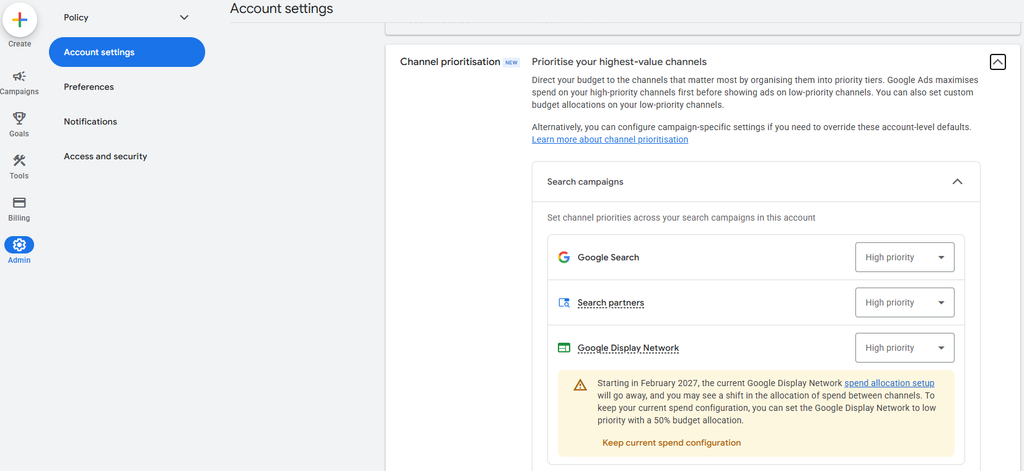
Google has added the new settings to the Account settings section of eligible advertising accounts.
To access the feature, sign in to Google Ads and open Admin → Account settings.
Look for the section labelled Channel prioritisation and expand it. The available options will depend on your account and campaign eligibility.
You can then select a campaign type, review its available advertising channels and assign High or Low priority.
For supported Low priority channels, Google also provides an optional Budget Allocation setting.
Once you have reviewed your choices, click Save to apply the settings.
If you cannot see Channel Prioritisation in your account, Google may not have completed the rollout for your account or campaign type.
Watch Our Google Ads Tutorial
Shap Shwani, founder of Mass Reach, has created a short tutorial demonstrating where to find the feature and how the new settings work.
Watch the Google Ads Channel Prioritisation tutorial on YouTube.
The video also explains how advertisers can prioritise Google Search and set budget percentages for eligible lower-priority channels.
Can You Set Different Priorities for Individual Campaigns?
Yes. Google allows eligible advertisers to override their account-level settings for individual campaigns.
To do this, open the relevant campaign and navigate to Settings. Expand Channel prioritisation and select the option to use campaign-level settings.
You can then adjust the priority levels and available Budget Allocation options.
This flexibility matters because different campaigns often serve different purposes. A campaign focused on generating enquiries may need a different approach from one designed to reach a wider audience.
For campaigns using a shared budget, the settings can apply across campaigns that share that budget, provided they meet Google’s eligibility requirements.
Google does not allow advertisers to set these controls directly through a manager account. You must access the individual advertising account.
How Do Bidding Strategies Affect Channel Prioritisation?
The impact of Channel Prioritisation depends partly on the bidding strategy.
For campaigns using Maximise Conversions or Maximise Conversion Value, Google generally favours High priority channels first. If those channels cannot use the available budget effectively, Google may direct additional spending towards Low priority channels.
Campaigns using Target CPA or Target ROAS work differently.
When these campaigns have enough budget, Google focuses on achieving the specified performance target across eligible channels. Changing the priority level alone may therefore have little effect.
However, percentage-based Budget Allocation can still influence spending on supported Low priority channels.
This distinction matters because advertisers should not expect every priority adjustment to produce an immediate change in campaign performance.
Before changing the settings, review your bidding strategy, budget limitations and current conversion results.
Important Changes Coming in February 2027
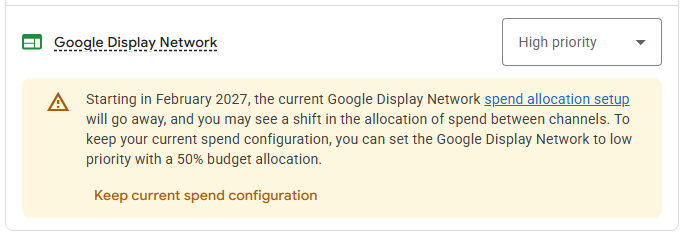
One of the most important parts of this update concerns Search campaigns using Display Expansion.
Display Expansion allows eligible Search campaigns to reach additional audiences through the Google Display Network.
Until now, Google has used an existing spending allocation system to manage these opportunities.
From February 2027, Google will automatically move Search campaigns using Display Expansion to the new Channel Prioritisation and Budget Allocation system.
This change will replace the existing Display spending configuration.
As a result, advertisers may notice differences in how Google distributes their budgets between Search, Search Partners and the Display Network.
Google has also confirmed that the Display Network will no longer serve through Search campaigns using the Target Impression Share bidding strategy after this transition.
Businesses should therefore review affected campaigns before the changes take effect.
How to Maintain Your Existing Display Expansion Settings
Google has provided guidance for advertisers who want to maintain their current Display Expansion spending configuration.
The company recommends assigning the Google Display Network Low priority with a 50% daily budget allocation.
This setting aims to preserve the existing approach as Google transitions to the new system.
However, that does not mean every advertiser should automatically choose 50%.
Some businesses may prefer to direct a larger proportion of their budget towards Google Search. Others may find that Display activity contributes valuable conversions.
The right decision depends on campaign performance and business objectives.
Advertisers should also remember that adopting the new settings before February 2027 immediately replaces the previous Display Expansion spending behaviour for affected campaigns.
Why Does Channel Prioritisation Matter for PPC Advertisers?
The main benefit is the additional influence advertisers gain over budget distribution.
A campaign may generate conversions across several channels, but those conversions do not always offer equal value.
For example, Google Search might generate fewer enquiries than another channel while producing a higher proportion of qualified leads.
If an advertiser only considers conversion volume, they may miss this difference.
Channel Prioritisation allows businesses to use that knowledge when deciding where Google should focus its spending.
However, the feature works best when advertisers understand their existing campaign performance.
Without reliable conversion tracking and meaningful reporting, changing priorities may simply move spending between channels without improving commercial results.
Why More Conversions Do Not Always Mean Better Results
One of the biggest mistakes in PPC management is treating every conversion as equally valuable.
Imagine two campaigns generating enquiries for a professional services company.
The first campaign produces 50 enquiries at £40 each. The second generates 25 enquiries at £70 each.
At first glance, the cheaper campaign may look more successful.
However, the picture changes if most of those cheaper enquiries never become customers.
This is why advertisers should consider lead quality alongside cost per lead.
The same principle applies when assessing performance across Google Search, Search Partners and the Display Network.
A channel that produces fewer conversions could still contribute more revenue if those conversions have greater commercial value.
Channel Prioritisation should support better business outcomes, not simply cheaper traffic.
Should You Always Give Google Search High Priority?
Google Search offers an important advantage because it allows advertisers to reach people actively looking for products or services.
For businesses focused on lead generation, this can make Search particularly valuable.
Someone searching for commercial solicitors, swimming lessons or specialist construction services may already have a clear need.
However, Google Search is not automatically the best channel for every business.
Some companies benefit from Display advertising or other channels because their customers need more time to research before making a decision.
An eCommerce retailer may also use several channels to reach customers throughout the buying journey.
Before changing priorities, advertisers should review conversion quality, acquisition costs and revenue across the available channels.
The strongest strategy will depend on what delivers results for the business.
Does Channel Prioritisation Give Advertisers Complete Budget Control?
Not entirely.
The new controls provide greater influence over budget distribution, but Google still uses automation to determine when and where adverts appear.
High priority does not guarantee that a channel will receive a fixed amount of spending.
Similarly, a 10% Budget Allocation setting does not guarantee that daily spending will always remain below 10%.
Google treats these percentages as best-effort limits.
Advertisers who want to prevent spending on an eligible Low priority channel can use a 0% allocation.
Otherwise, businesses should continue monitoring performance and reviewing their settings regularly.
The feature offers more flexibility, but it does not replace campaign management or performance analysis.
What Should Businesses Do Before Changing Their Settings?
Businesses should begin by reviewing their existing Google Ads accounts.
Check whether Channel Prioritisation is available and identify which campaigns support the new controls.
Next, review where your advertising budget currently goes and which channels generate valuable results.
Consider whether Google Search, Search Partners or the Display Network contributes the most useful traffic, enquiries and sales.
Businesses should also check their bidding strategies. This will help them understand how priority adjustments might affect spending.
If your account uses Display Expansion, review Google’s February 2027 guidance before changing the existing configuration.
Finally, record your current settings and monitor performance after making any adjustments.
This approach makes it easier to identify whether the new controls improve efficiency or simply change where Google spends the budget.
Our View at Mass Reach
At Mass Reach, we welcome updates that give advertisers more influence over their campaigns.
However, greater control does not automatically lead to better performance.
Businesses still need accurate conversion tracking, effective targeting, strong landing pages and reliable reporting to understand whether their advertising is delivering commercial value.
Google Ads Channel Prioritisation provides another useful tool for managing paid media budgets.
For some businesses, it may help reduce spending on lower-value channels. Others may use it to explore additional advertising opportunities without giving those channels the same priority as their main campaigns.
The important thing is to make decisions using performance data rather than applying identical settings across every account.
As a performance marketing agency, Mass Reach focuses on connecting advertising spend with qualified leads, sales and measurable business growth.
Our approach considers the entire customer journey rather than focusing only on clicks and conversions.
Need Help Reviewing Your Google Ads Budget?
With Google’s new controls rolling out and further changes approaching in February 2027, now is a sensible time to review your PPC campaigns.
Understanding where your budget goes can help you identify wasted spend and potential opportunities for improvement.
Mass Reach helps UK businesses manage Google Ads campaigns, improve conversion tracking, optimise landing pages and develop performance-focused advertising strategies.
Whether you need help with Google Search, Shopping, Performance Max or wider paid media management, we can help you assess where your advertising budget delivers the most value.
Speak to Mass Reach to arrange a strategy call and explore opportunities to improve your Google Ads performance.
Official source: Google Ads Help – About Channel Prioritisation and Budget Allocation
Video tutorial: Mass Reach – Google Ads Channel Prioritisation Explained
Frequently asked questions
Google began progressively introducing Channel Prioritisation to eligible Google Ads accounts on 15 October 2026. The rollout includes the UK, but availability can vary between accounts and campaign types. Check your account settings to see whether the feature is available.
Where the feature and channel are supported, Google allows advertisers to set the Display Network to Low priority with a 0% budget allocation, which prevents spending on that channel. You should also review whether Display is enabled within the relevant campaign.
Not necessarily. Giving Google Search High priority can influence how Google distributes budget, but it does not guarantee more conversions or better leads. The impact depends on your bidding strategy, campaign settings, available demand and conversion performance.
You can set a best-effort percentage allocation for supported Low priority channels in Performance Max. However, you cannot use this setting to assign exact individual percentages to every Google surface, such as Search, YouTube or Gmail, because several surfaces are grouped together as Google channels.
Google will migrate Search campaigns using Display Expansion to the new Channel Prioritisation and Budget Allocation system. The existing spending configuration will be removed, which may change how budgets are distributed. Google recommends Low priority with a 50% Display allocation for advertisers wishing to maintain the previous configuration.
No. Google describes percentage allocations as best-effort limits, which means daily spending can occasionally exceed the selected percentage. The allocation is calculated using the campaign’s average daily budget, and the setting should not be confused with a guaranteed daily spending cap.
The controls are optional during the rollout, and account-level defaults can apply to eligible campaigns unless overridden. However, existing Search campaigns using Display Expansion are scheduled to transition automatically in February 2027. Advertisers should review their settings before that change takes effect.